Been deploying a bunch of quick honeypots recently, for commonly exploited services, with a particular focus on having proper logging configured which is often an afterthought; first one going to quickly write about is MongoDB. I don’t imagine this blogpost will contain anything ground breaking (“ransom” of exposed mongoDB’s are well documented in terms of scope) – but really just wanted to see 1st hand:
- How to configure logging
- How long after exposure of service would it be compromised (included how long after being indexed by Shodan)
- If data base actually copied prior to drop and replacement
- Hints of tooling used
- Logging Configuration
Logging was remarkably quick to configure (may in some versions be enabled by default). Modify config file @ /etc/mongodb.conf and uncomment the log path line – Default log path set to logpath=/var/log/mongodb/mongodb.log. If you change the configuration be sure to restart MongoDB service (systemctl restart mongodb.service)
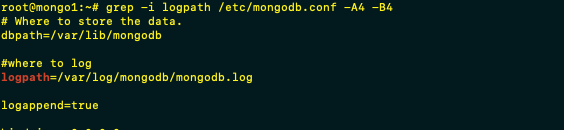
Next step in the logging configuration was simply to forward logs – in this instance Splunk free is my SIEM of choice given its ease of setup – with MongoDB.conf log shipped to splunk via UF.
Logs our pretty verbose

2. Shodan
Just search in Shodan with the below query will show the sheer amount of DB’s that are tagged as compromised:
“MongoDB Server Information” port:27017 -authentication
The host was put online at 16:00 UTC with unauthenticated MongoDB ports exposed at that time. This was picked up by Shodan at 19:45 UTC – so 3 hours 45mins after exposure….obviously this will vary massively. But keen to see if that affected the amount of IP’s scanning this host…the conclusion…not really – the chart below shows the Shodan scan IP, and we don’t really see much of a spike in the following 21hours

2. How Soon after being online do we see unauthorised access
Surprisingly at least to me – the first signs of someone connecting to the database (outside of Shodan) did not come until 09:11 UTC – basically 17 hours after it was put online…unsurprisingly despite claims that the data has been exfil’d first act was to create the new “Ransom” collection… sequence as follows for this specific event, one interesting piece is lack of querying collection names….maybe names collected from Shodan or its not logged
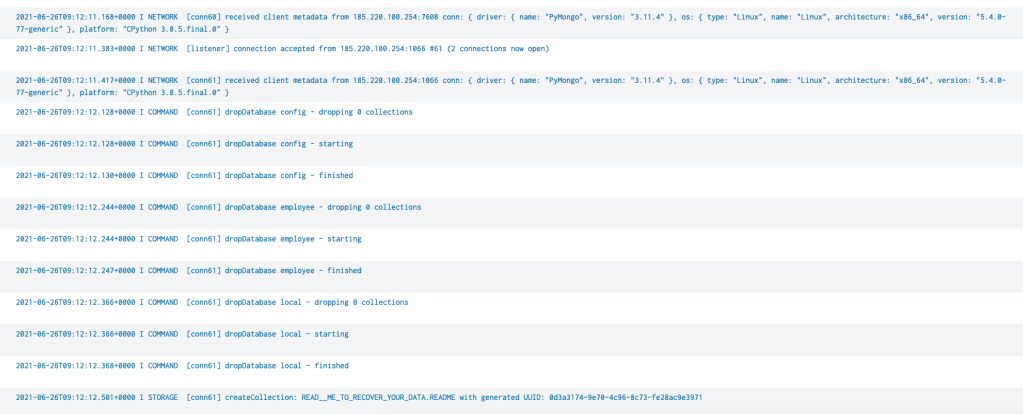
Traffic originated from 185.220.100[.]254 which is a Tor Exit Node in Germany, host with the following driver info – { driver: { name: “PyMongo”, version: “3.11.4” }, os: { type: “Linux”, name: “Linux”, architecture: “x86_64”, version: “5.4.0-77-generic” }, platform: “CPython 3.8.5.final.0” }
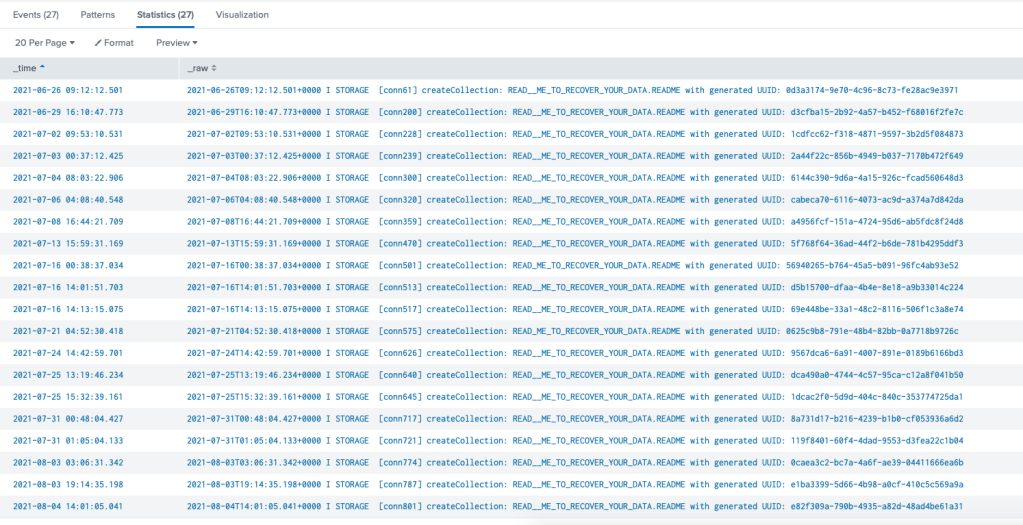
Unfortunately at this point I got distracted by life and forgot about this host for longer than I should have (until I started getting VPS top up notifications) so I didn’t capture this specific note or wallet – which I was intending to track………..so almost 2 months later looking back at how many times it was “ransomed” we can see a total of 27 – oddly the same name was used in all
Latest Note (didn’t capture the others)
All your data is a backed up. You must pay 0.03 BTC to 1MocUGqhJCirginPw7GGzhfqQ8vyofWuJL 48 hours for recover it. After 48 hours expiration we will leaked and exposed all your data. In case of refusal to pay, we will contact the General Data Protection Regulation, GDPR and notify them that you store user data in an open form and is not safe. Under the rules of the law, you face a heavy fine or arrest and your base dump will be dropped from our server! You can buy bitcoin here, does not take much time to buy https://localbitcoins.com or https://buy.moonpay.io/ After paying write to me in the mail with your DB IP: myDBpjp8@recoverme.one and you will receive a link to download your database dump.
Looking at the unique drivers, looks like all connections were via PyMongo

if we sort these by time – there is some variation between versions back and forth (whilst the ransom not holds same format, likely multiple actors or multiple hosts by same actor)
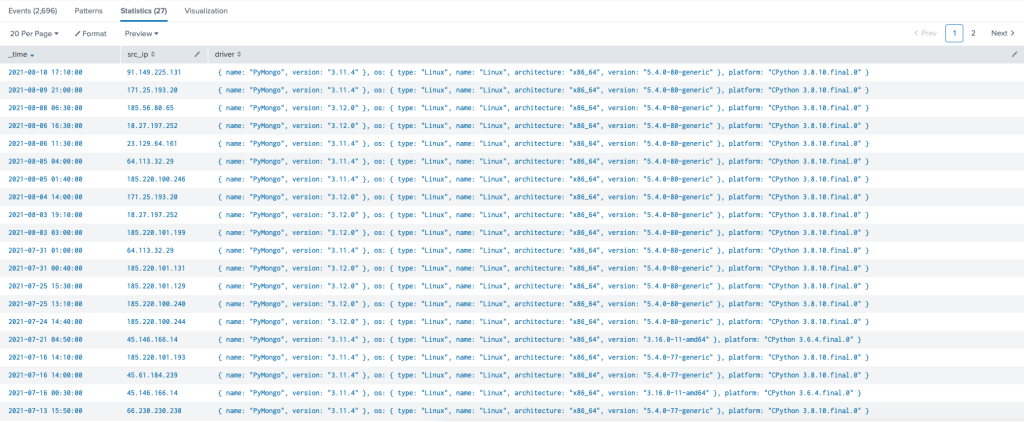
At this point will include the ugly splunk SPL (since I didn’t parse the logs) on the of chance its helpful to someone
index=_* OR index=* sourcetype=mongodb | table _time, _raw | transaction maxspan=10m mvraw=true | search _raw="*READ__*" | eval rawCopy = _raw | mvexpand rawCopy | table _time, rawCopy | search rawCopy="*received client metadata from*" |rex field=rawCopy "(?<src_ip>\d{1,3}\.\d{1,3}\.\d{1,3}\.\d{1,3})" | rex field=rawCopy "driver:(?<driver>.*)" | bucket span=10m _time | dedup _time | table _time, src_ip, driver
Back to those IP’s
22 Unique IP’s during that timeframe all of these being Tor exit nodes
| 91.149.225.131 171.25.193.20 185.56.80.65 18.27.197.252 23.129.64.161 64.113.32.29 185.220.100.246 185.220.101.199 185.220.101.131 185.220.101.129 185.220.100.240 185.220.100.244 45.146.166.14 185.220.101.193 45.61.184.239 66.230.230.230 154.94.7.85 171.25.193.25 104.244.72.115 185.83.214.69 185.220.101.138 185.220.101.215 |
In Summary
If you put an unauthenticated MongoDB online – this will get compromised likely within 24hours, and likely multiple times, but this carries a huge amount of data exposure…whilst the deletion events did dump the data…numerous other queries were made against the data (may add those to the post).
Even with authentication – ensuring logging is enabled, being consumed and monitored is fundamental, multiple detection opportunities here….collection drop/creation actions in a short space of time from TOR with PyMongo (safe listing IP’s as needed), connections from TOR, collection creation containing “*recover*”
But the bottom line – THINK before you expose any service to the internet….if it has any weakness it will be exploited
 Dfur
Dfur 