Background
I was recently reviewing some Windows Defender logs and noticed that many of the detections had file origin information and not just the MOTW ADS Zone identifier, had seen these before and largely forgot it existed. Quick bit of googling later and really didn’t get a huge amount of information back on this (fundamentally the terms I was searching at the time didn’t have any great matches) so decided to research it a bit more.
Testing
Downloading a quick (and older) Emotet Sample from Any.run just to test and generate and some 1116,1117 events in defender – https://app.any.run/tasks/3363fde4-111b-4aaa-b73d-e4144433c284/# (any.run is an awesome sandbox – great gui to support detection development)
After downloading the zip file and extracting the .doc with the native windows zip – we see windows defender popups which is expected.
Lets check out the Streams and Zone Identifier from the zip first;
Get-Item .\emotet.doc.zip -Stream *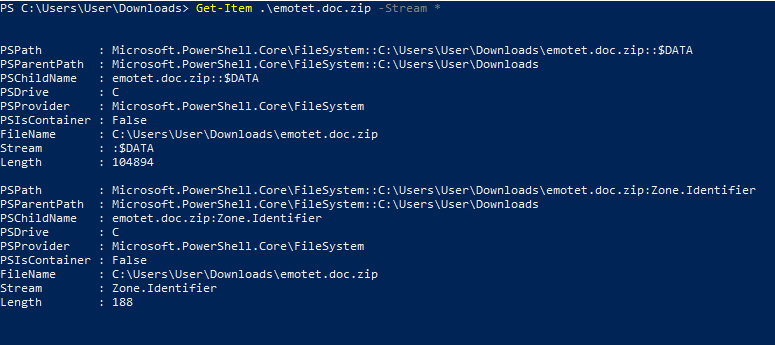
The above shows us both the data stream $Data, additionally the Zone.Identifier ADS. We can see Zone.Indentifier length is 188 – we can derive from this that there is more info in this ADS stream than just the ZoneID. Just Zone ID would be around 24 bytes vs 188 bytes show above. With the Get-Content cmdlet we cn get the contents of the item at the specified location in this instance the content of the ADS by specifying the Zone.Identifier stream
Get-Content -Path .\emotet.doc.zip -Stream Zone.Identifier
Great; we can see not just the ZoneId, but also the ReferrerUrl and also the HostUrl – which aligns exactly with how this file was downloaded. To Recap on ZoneId’s:
| Zone ID | Zone Label |
| 0 | My Computer |
| 1 | Local Intranet |
| 2 | Trusted Sites |
| 3 | Internet |
| 4 | Restricted Sites |
So ReferrerUrl and HostUrl are precisely the fields we are interested in. Now checking the zip file we uncompressed to see what ADS fields it has (will be skipping the initial get-item cmdlet.

The above uncompressed file – has a modified ADS but has maintained the ZoneID=3 MOTW, interestingly the ReferrerURL now contains the zip file location from where it was unpacked. This would be valuable information in a DFIR case where other log events/event logs had rolled over (providing ADS not removed).
May be differences in this ADS field based on the un-archiving tool, so putting some to the test (recording versions of each) and utilising the same archive file as above – re-adding inbuilt windows unarchiver to that list:
| Tool | Version | Behavior |
| (Builtin) Compressed Folders | Win 10 2009 | ReferrerUrl – Archive file location from where it was extracted ZoneId – kept Id=3 |
| Winzip | 25.0 (14273) | ReferrerUrl – Archive file location from where it was extracted ZoneId – kept Id=3 |
| Winrar | 6.00 | Only Maintained ZoneID i.e. ZoneID=3 |
| 7Zip | 19.00 | No Zone.Identifier Stream |
| PeaZip (Never heard of this tool tbh but was listed on Ninite) | 7.7.0 | No Zone.Identifier Stream |
Based on the above Comparison – both Inbuilt tool and Windows maintained the most information, Winrar just kept the ZoneID and both 7Zip and PeaZip removed the Zone.Identifier ADS. Had not intended to perform the next test but due to the widely differing results from the un-archiving tools – will test a number of browsers (Chrome being the one we previously used to download) – Many of these are based on chromium but keen to see any differences if any.
| Browser | Version | Behavior |
| Chrome | 88.0.4324.104 (chromium based) | Provided ReferrerUrl, HostUrl, Set ZoneID in Zone.Identifier ADS |
| Opera | 73.0.3856.344 (chromium based | Provided ReferrerUrl, HostUrl, Set ZoneID in Zone.Identifier ADS |
| MS Edge | 88.0.705.50 (chromium based) | Provided ReferrerUrl, HostUrl, Set ZoneID in Zone.Identifier ADS |
| Internet Explorer | IE 11 (Version 20H2) | Interestingly Just ZoneID=3 |
| Firefox | 84.0.2 | Provided ReferrerUrl, HostUrl, Set ZoneID in Zone.Identifier ADS |
| Brave | Version 1.19.86 Chromium: 88.0.4324.96 (chromium based) | ZoneID set correctly – though no referrer – just an incorrect HostUrl – (unrelated to the download – HostUrl=about:internet – so likely bugged) |
References
 Dfur
Dfur 